 InRoom Wall ArtPortfolio · 2026
They see it on their wall. They pay without leaving the camera.
A Shopify app for shops that sell wall art. It shows every piece at real size, in its real frame, on the customer's own wall — and puts the pay button inside the augmented reality.
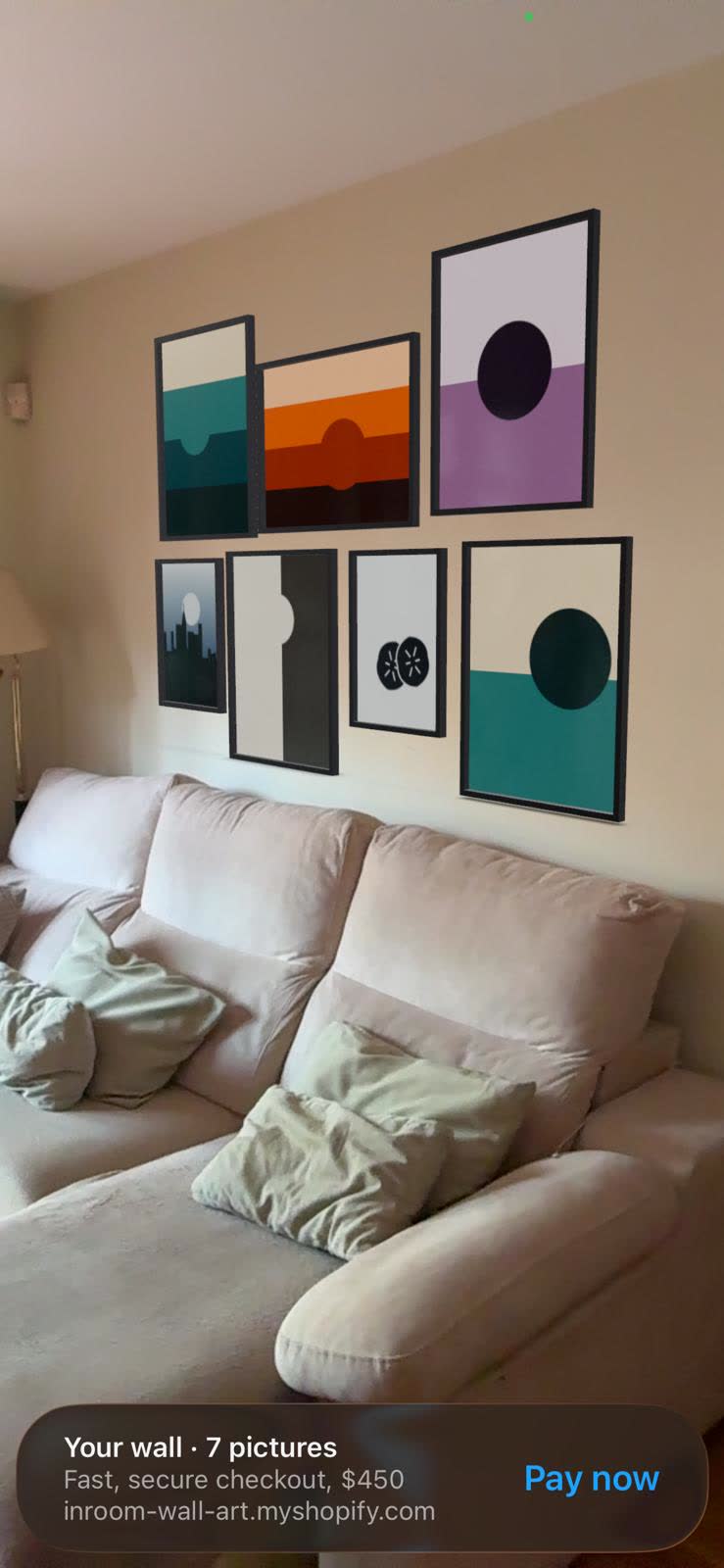
native banner with «Pay now»
inroom.es
01The problem
Anyone selling prints online hits the same wall: the customer can't picture it. They don't know whether 50 × 70 is big for their room, whether oak goes with their living room, or how it sits next to what's already hanging. That doubt gets paid for in abandoned carts and in returns over size.
02If you sell five pieces, you pay for five pieces
Almost every app in this space charges a flat fee. Two thousand references or fourteen — you pay the same. For an illustrator selling their own work, or a small shop just starting out, that means paying for a catalogue you don't have.
That's why the Artist plan exists: $0.40 a month for each piece that has AR switched on. No minimum. Switch on six prints and you pay for six. Switch two off and you stop paying for them.
| Pieces with AR | Artist | Flat fee (Pro) | What suits you |
|---|---|---|---|
| 3 | Free | — | The free plan, no card and no expiry |
| 6 | $2.40 | $19 | Artist |
| 20 | $8.00 | $19 | Artist |
| 48 | $19.20 | $19 | They cross here: from this point, Pro |
| 500 | $200 | $19 | Pro, no argument |
The break-even is 48 pieces. Below that, paying per piece works out better; above it, the flat fee does. You don't have to work it out: the dashboard tells you where you stand and which one suits you.
AR stops being a big-shop thing
An artist selling twelve prints pays $4.80 a month to have augmented reality on all of them. That's less than a coffee a week, and it's exactly the same technology a shop with two thousand references uses: the same native viewer, the same frames in millimetres, the same pay button inside the camera.
And before paying anything, the free plan is three pieces with AR, no card and no expiry date. It isn't a fourteen-day trial: it's a plan, and it can stay that way forever. The only difference is that an InRoom mark shows on the widget.
03The piece on their wall, at real size
The customer taps a button and the augmented reality viewer on their own phone opens. No app to download, no account to create. The piece anchors to the wall and shows at its real size, in the frame you're going to ship them.
Apple's viewer, the same one they use to look at furniture before buying it. The app hands it a USDZ model generated on the fly with the artwork and its frame.
Google's viewer, already on the phone. Same model, GLB format.
A panel opens with the code. Scanning it opens the product page on their phone and the AR fires on its own: the customer doesn't have to look for anything.
04Zero friction: they pay without leaving the camera
This is where the sale is normally lost. The customer sees the piece, doubts the size, goes off to measure, and by the time they come back — if they come back — they've cooled off. InRoom cuts that path short: the pay button lives inside the augmented reality viewer.
From the product page. The iPhone's own viewer opens and the piece anchors to the wall, at its real size.
Underneath, iOS shows the title, the size they picked and the price, highlighted. It isn't a sticker of ours: it's the system's own bar.
That exact variant goes into the cart and lands in your Shopify checkout, where Apple Pay and Shop Pay are native.
Two taps and no trip back to the product page. The sale closes at the moment the customer is most convinced — looking at the piece hanging in their own living room — instead of sending them back to the page to think again.
InRoom never touches the money
The price on the bar is informational. The charge is made by your Shopify checkout, with your gateway, your terms and your rates. The app doesn't process payments or store cards: it only puts the right variant in the cart and sends you a customer who has already decided.
That purchase banner belongs to iOS and only appears in Safari: Apple puts it there, not us. On Android the AR works just as well — Scene Viewer, real size, with its frame — but without the banner: the customer goes back to the page to buy. Since most wall-art traffic comes in on iPhone, the short path covers nearly everyone; but you're better off knowing now.
05Real frames, not flat images
Most apps in this space paste an image onto the wall. InRoom draws the physical object: your moulding defined millimetre by millimetre, mounted outside the artwork, with its mat, its bevel and the glare off the acrylic. Wood with grain, metal with sheen, or matte lacquer.

| What you define | In what unit | What changes in the AR |
|---|---|---|
| Moulding thickness | Millimetres | The edge seen from the side and the shadow it casts |
| Mat width | Millimetres, per axis if needed | The air between the artwork and the frame |
| Depth | Millimetres | How far it stands off the wall |
| Acrylic | Yes or no | The reflection on the glass |
| Rules by size | Optional | A wider frame for the large posters |
Each frame is tied to a value of your products' «Frame» option, so when the customer switches variant, the render, the price and the AR's 3D model all change with it. The app never creates or edits your variants: it reads what you already sell.
06Sell the wall, not the picture
This is where the order value moves. There are two tools, depending on how involved the customer wants to get.
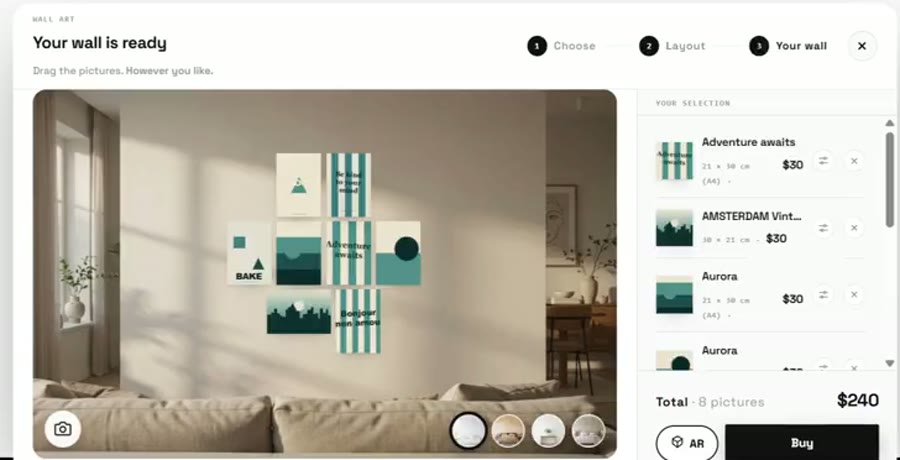
The Composer is the quick route: three steps on the collection page — pick pieces, see three arrangements built with them at their real proportions, adjust, and the whole thing into the cart at once, marked as a set.
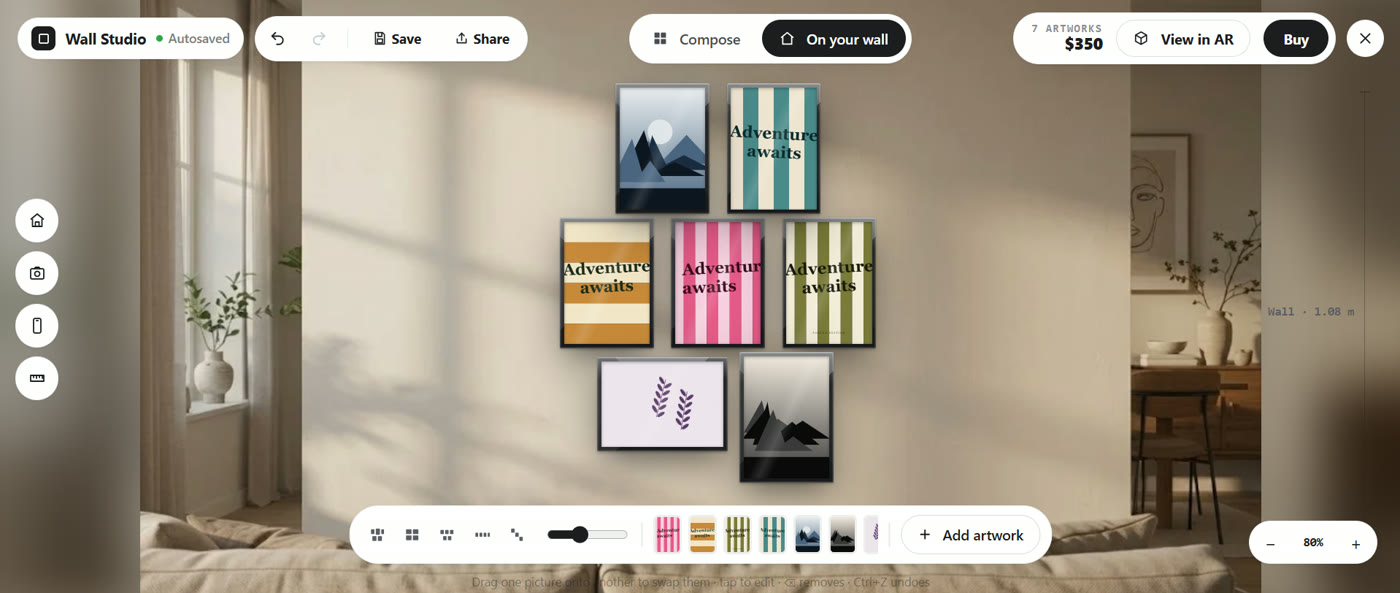
The Wall Studio is for the customer who wants to decide: a full-screen studio where they drag to swap, tap to edit the frame, undo with Ctrl+Z, and see the measurements in real centimetres of the set they're about to hang. With an «On your wall» mode over a calibrated room photo, or over a photo of their own living room.
07The Hypercatalogue
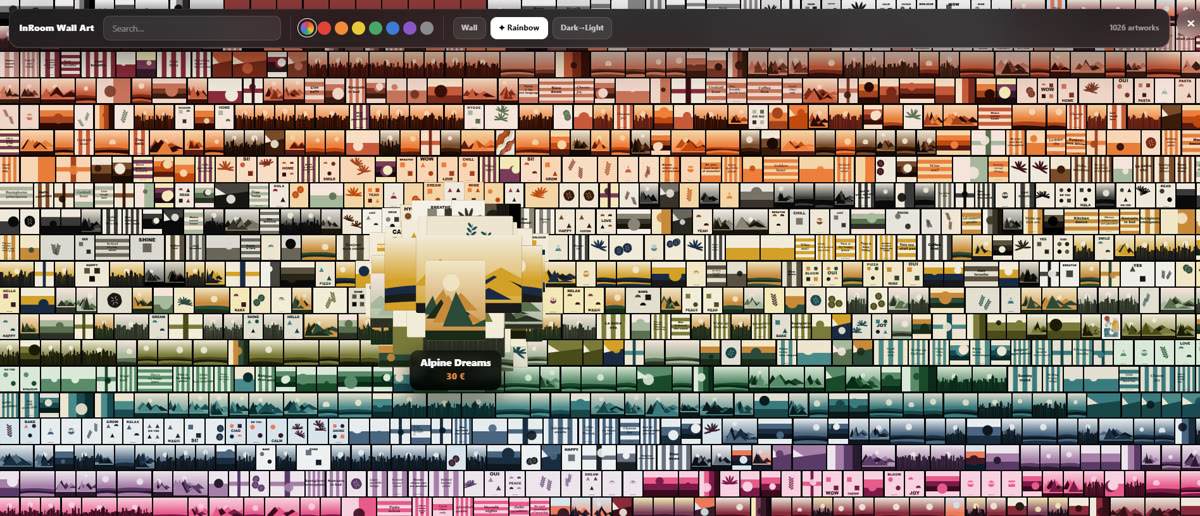
Three hundred prints in a grid of twenty-four per page die on page three. The Hypercatalogue turns the whole catalogue into a place you travel through, with a lens that magnifies wherever the customer moves, and a colour filter in which each piece's dominant tone is worked out automatically. Because nobody buys art by reference number: they buy «something terracotta for above the sofa».
08It dresses in your shop's clothes
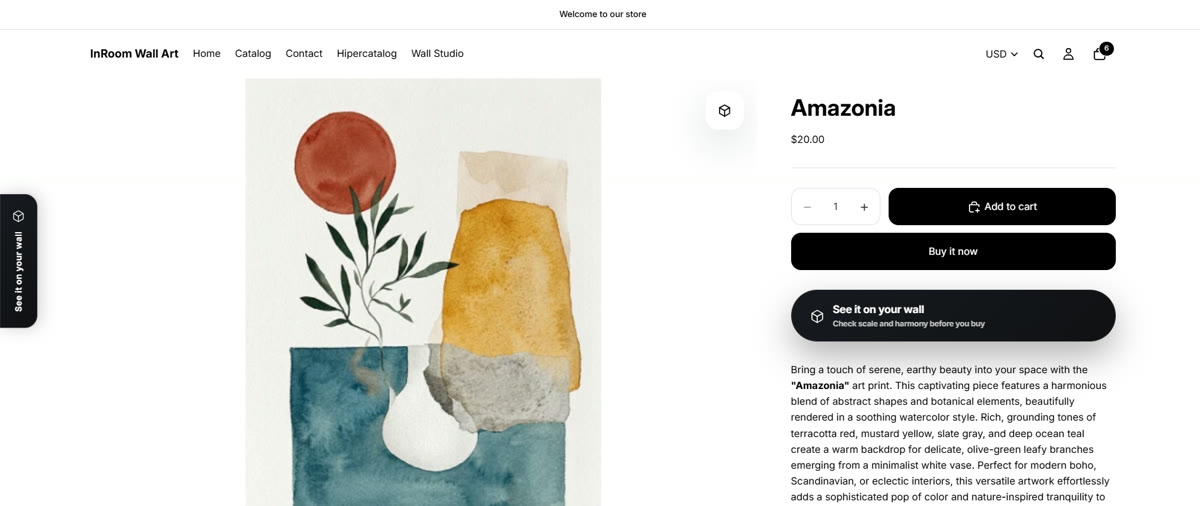
On the product page the buyer sees three elements: the icon over the photo, the side tab and the button in the buy box. All three come with twenty complete visual identities —decor, premium, pop and tech— with live preview, and each one can be tuned control by control. The QR panel too, and it can carry the print itself inside the code.
 1
2
3
1
2
3
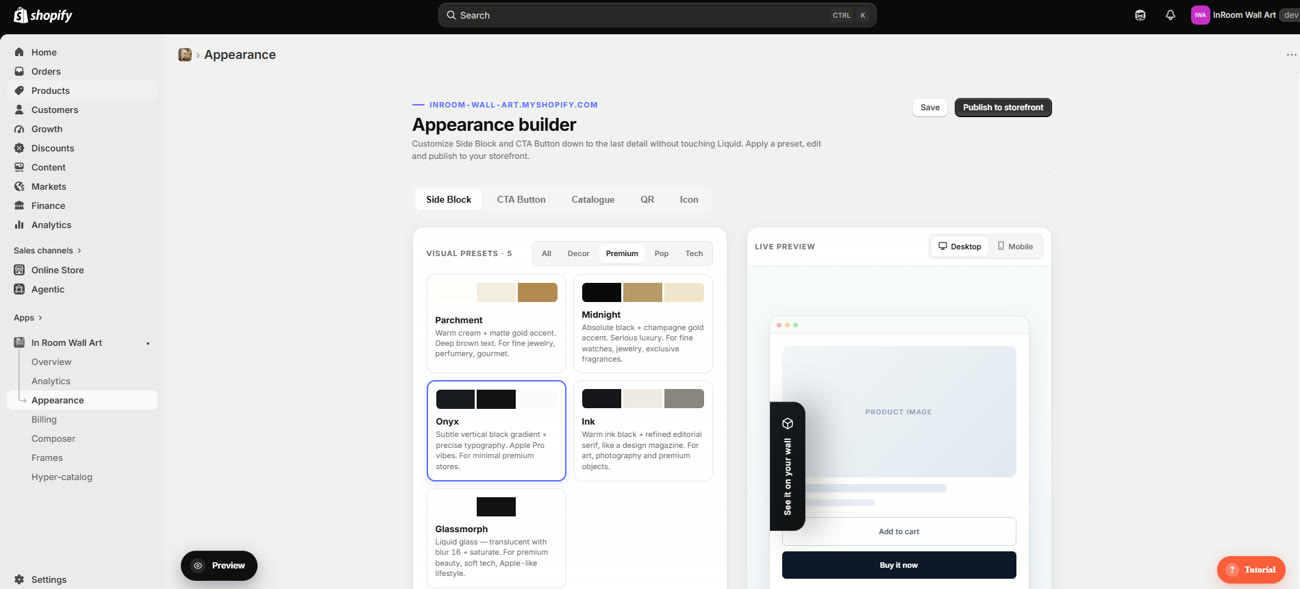
And «customisable» here isn't an adjective: the Side Block, the button and the icon share seven tabs of settings —style, typography, icon, layout, animation, copy and visibility. Inside there are two-stop gradients, a glass effect with blur, a corner radius from square to capsule, letter-spacing, the easing curve of the hover, an animated dot that reinforces the call to action, and which screens it appears on. Without touching a line of Liquid.
And it speaks your customer's language
Everything the buyer sees —the button, the tab, the QR panel, the Composer, the Wall Studio and the Hypercatalogue— is translated into ten languages, and so is the admin dashboard:
It ships on automatic: each visitor sees the widget in your Shopify store's language, and where there's no translation it falls back to English. You can also force a fixed one. Nothing to translate by hand, no duplicate strings to maintain: it comes done.
And a fourth one, off the product page: the whole catalogue
A button appears over every thumbnail in your collection. On mobile it launches the AR right there, without going through the product page; on desktop it opens the QR without leaving the listing. It's the difference between AR being something the customer finds if they open a product, and AR being something that meets them across the whole catalogue.
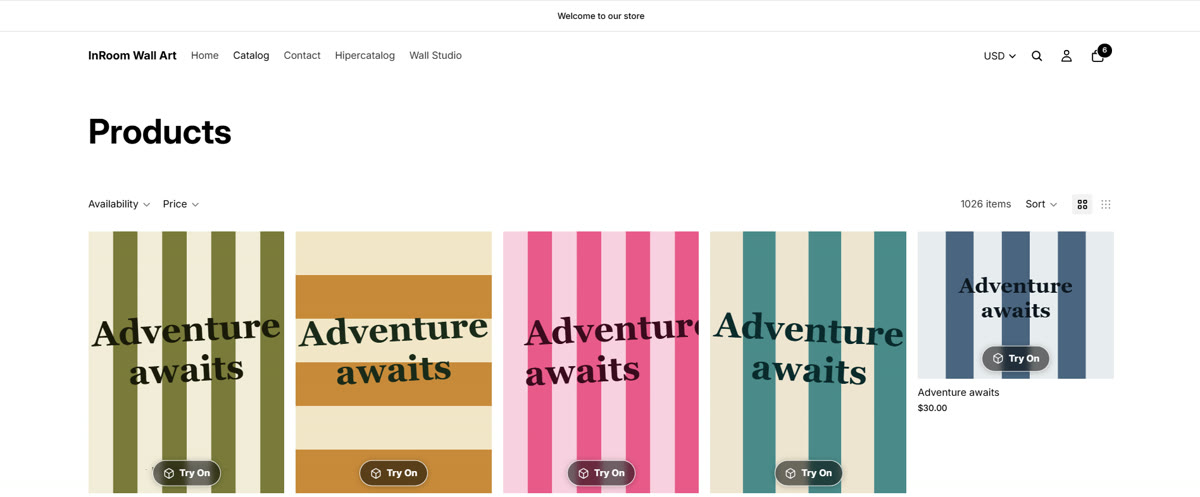
It shows on every piece that has AR switched on, so on the free plan you'll see it on three. To have it across the whole catalogue you need a plan without a cap: Artist, paying per piece, or Pro at $19 a month, flat and unlimited.
09Against the alternatives
| InRoom | The rest of the field | |
|---|---|---|
| AR at real size | Yes | Yes |
| Photo of their own room | Yes, calibrated in cm | Yes |
| Paying inside the AR | Yes | Not advertised |
| A whole wall to one cart | Composer and Wall Studio | Not advertised |
| Frames in millimetres | With rules by size | Not advertised |
| AR from the grid | Without going through the product page | Not advertised |
| Navigable catalogue | Hypercatalogue | Not advertised |
Compared in September 2026 against what ArtPlacer and Picture It publish on their own sites and on the Shopify App Store. «Not advertised» means it doesn't appear in their public material, not that it's impossible.
10What it costs
| Plan | Price | What it adds |
|---|---|---|
| Free | $0 | Three pieces with AR, with the InRoom mark visible |
| Artist | $0.40 / piece / month | AR with no cap, paying for each piece switched on |
| Pro | $19 / month | Unlimited AR on a flat fee, plus analytics |
| Studio | $39 / month | Composer and Wall Studio |
| Enterprise | $69 / month | Hypercatalogue |
Fourteen days' trial on the fixed plans and two months free on annual billing. From 48 active pieces, Pro works out cheaper than Artist. All billed by Shopify, on your account, and cancellable from there.
11Who makes it
Ian Otero Casamitjana, from Sabadell, Barcelona. A double degree in Industrial Engineering and Business Administration, which is exactly why this app exists the way it does: the engineering half explains why frames are defined in millimetres and why the studio works in centimetres on the plane of the wall; the business half, why the argument is average order value and not how pretty the AR looks.
It's a one-person project. That means you talk to whoever writes the code and that what you ask for can go in without passing a committee — and also that there isn't a team of twenty behind it, which is better said now than discovered later.
Try it in your shop, free and without a card.
The free plan is three pieces with AR, no expiry. Nothing to decide: install it, switch on three prints and see what happens in your own shop. If you'd rather, I'll set it up for you.
hello.inroom.app@gmail.com
Shopify App Store